Data source contains objects that should be filtered away

A data source Projects (all active). Is filtered to contain projects that exist in either Projects (runtime filter, temp, many) or Projects (runtime filter, temp, search). Most of the time this works correctly, however, sometimes the data source contains objects that are not in either data source.

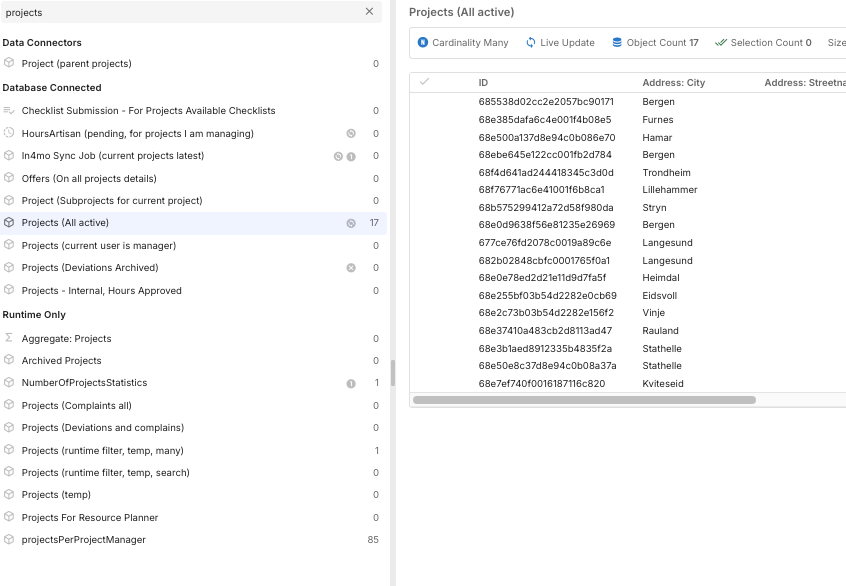
In the example bellow Projects (runtime filter, temp, many) contains 1 object and Projects (runtime filter, temp, search) contains 0 objects. Projects (all active) contains 17 objects, meaning it does contain objets that are not in either data source, despite the data source filtering.

Could this be caused by some kind of race condition, or event mishandeling in appfarm?

Hi,

Can it be that you gave a client filter on the data source, and at the same time, a database filter dependent on that same data source somehow? Not too usual pattern, so might be a potential source for race contition.

The DB connected datasource does have a client filter. Neither of the runtime data sources does.

On a related note. I tried to resolve the issue by checking if the length of Projects (all active) is equal to the length of Projects (runtime filter, temp, many) + Projects (runtime filter, temp, search), and then running the action again if the length does not match. However, it seems a run action node that runs the action it is triggered from does not work?

Yes, I know, but what is the client filter - is it using the same data source as the data souce filter?

No. There are several client filters on Projects (all active), but neither are using Projects (runtime filter, temp, many) or Projects (runtime filter, temp, search).

Woops. I looked at the wrong place to find client filters. But the answer to your question remains the same:

Ok. Sounds like something related to your other post. Not experienced such issues anywhere else, so not a general thing I believe (or, it might be so, but not experienced yet). But as you mention, this only occurs sometimes, making it very hard to solve without more info or a way to reproduce consequently.

Can you see what the content of those "right-side’ data sources are when this occurs?

Right side as in Projects (runtime filter, temp, many) and Projects (runtime filter, temp, search)? In the case I have tested, only the Projects (runtime filter, temp, many) data source has objects. This data source contains one object:

I am not able to reproduce it consistently. The input sequences that some times causes the issue to occur does in other cases not cause the issue to occur.

While working with this issue I have had some problems with the environment. Right now I am not able to open the app, because I am not able to connect to Appfarm. This is the seccond time it has happened in the last two hours. I do not know if that is related or not.

Hi,

Please contact support if this issue persists! Might be related (environment instabilities causing inconsistent hickups).

This is a persistent issue. It was reported by a user working in the production environment four days ago. I have found a workaround, which is to run a copy of the action when the action acts up.

I added some logging last that, was pushed to production at midnight 9 hours ago. By now this issue has occurred 22 times in the production environment. In 19 of those, running a copy of the action resolved the issue.

Hi,

What does this action do - populating the runtime data sources (i.e. the data sources for the right side of this filter)? Would be great with some more info on that action (screenshot / relevant filters). Also if those runtime data sources have some client filter, or if this behaviour occurs in combination of disable/enable data sources.

The action reads to the datasource Projects (runtime filter, temp, many). Objects are read to the datasource 4 times with “add to data source (merge duplicates)” All the reads should have the same conditional filter, but with some differences in filter. There are no enable / disable data source. When I have seen the issue, there has been a client filter active.

The most relevant part is a parallel execution block that reads to the datasource 3 times and runs an action that reads to the data source 1 more time.

1 Like

We have started an internal investigation on this issue. Will let you know when we are able to reproduce it!

1 Like

I have some more information that may be useful. I have identified a very similar issue with the same data sources that I can reproduce consistently.

Projects (all active) is filtered Id exists in Projects (runtime filter, temp, search) or Id exists in Projects (runtime filter, temp, many).

Projects (all active) also has a client filter: If App variables.search has value: Projects (all active).Id exists in Projects (runtime filter, temp, many).

Initially Projects (runtime filter, temp, many) has objects while Projects (runtime filter, temp, search) is empty. Projects (all active) contains the objects in Projects (runtime filter, temp, many), as it should

We populate Projects (runtime filter, temp, search). Projects (all active) now only shows the objects in (runtime filter, temp, search), as it should.

We then remove the objects in Projects (runtime filter, temp, search). Projects (all active) now contains 20 objects, even when Projects (runtime filter, temp, many) contains more than 20 objects. This can be reproduced consistently.

In the app and in devtools Projects (all active) shows 20 objects. I loged the Projects (all active).length to the console in a function. In the console the length of Projects (all active) is printed as 399.

Where does the number 20 come from? There is no good reason why Projects (all active) should contain exactly 20 objects. The best reason I can think of is that when Projects (runtime filter, temp, many) is populated we read to the datasource 4 times. One of the reads has a limit of 20. We can also see that when this limit is increased, Projects (all active) contains more objects consistent with the limit.

Hi,

A bit late here, but neither I or colleagues has been able to reproduce this. Trying to set this up as described, but working, so we need either more info (e.g. screenshots of these read objects x 4, and how the client filter is set up on the database connected data source), or access to a standalone app where this case is reproduced. In a complex app, there may be other factors / setup that affects this, or there may be race conditions somehow (e.g. conditions and filters co-dependent on each others etc).